What it is
A board of live widgets that share one symbol and one expiry.
Open + Widgets, pick a panel, and it drops onto a grid. Drag a widget by its header to move it, drag its edges to resize. Change the board's symbol or expiry once in the top bar and every widget on that board updates together.
You can keep several boards as tabs — one for NIFTY, one for a stock, one for an event day — and flip between them. Each board keeps its own widgets, sizes, symbol and expiry.
The widget catalogue
| Group | Widgets |
|---|---|
| Markets | Price chart, strategy chart, market breadth, sector change (F&O stocks and indices), stocks scanner, MCX futures |
| Chain | Option chain; chain metrics (spot, PCR, max pain, ATM IV); CE / PE totals and ratios; CE / PE summed Greeks |
| Straddle and strangle | Straddle chart and table, rolling ATM straddle, strangle chart and table |
| OI / IV | OI metrics, cumulative OI, IV chart, strike chart |
| Greeks | Greeks summary; DEX, GEX, TEX and VEX exposure; cumulative GEX; net exposure summary |
| Composite | Cumulative LTP, composite OI, PCR over time, cumulative delta volume |
A widget can override the board where it makes sense: its own symbol, expiry, timeframe or strike range. Anything you do not override follows the board.
The starting layout
A new board starts with a sensible cockpit you can rearrange: chain metrics across the top; a price chart, an option chain at ±5 strikes and OI metrics at ±10 strikes in the middle; and a straddle table across the bottom. From there most people add one exposure widget and one breadth widget and remove what they never look at.
Boards are saved in your browser. Build them on the machine you trade from; a different browser starts with the default board.
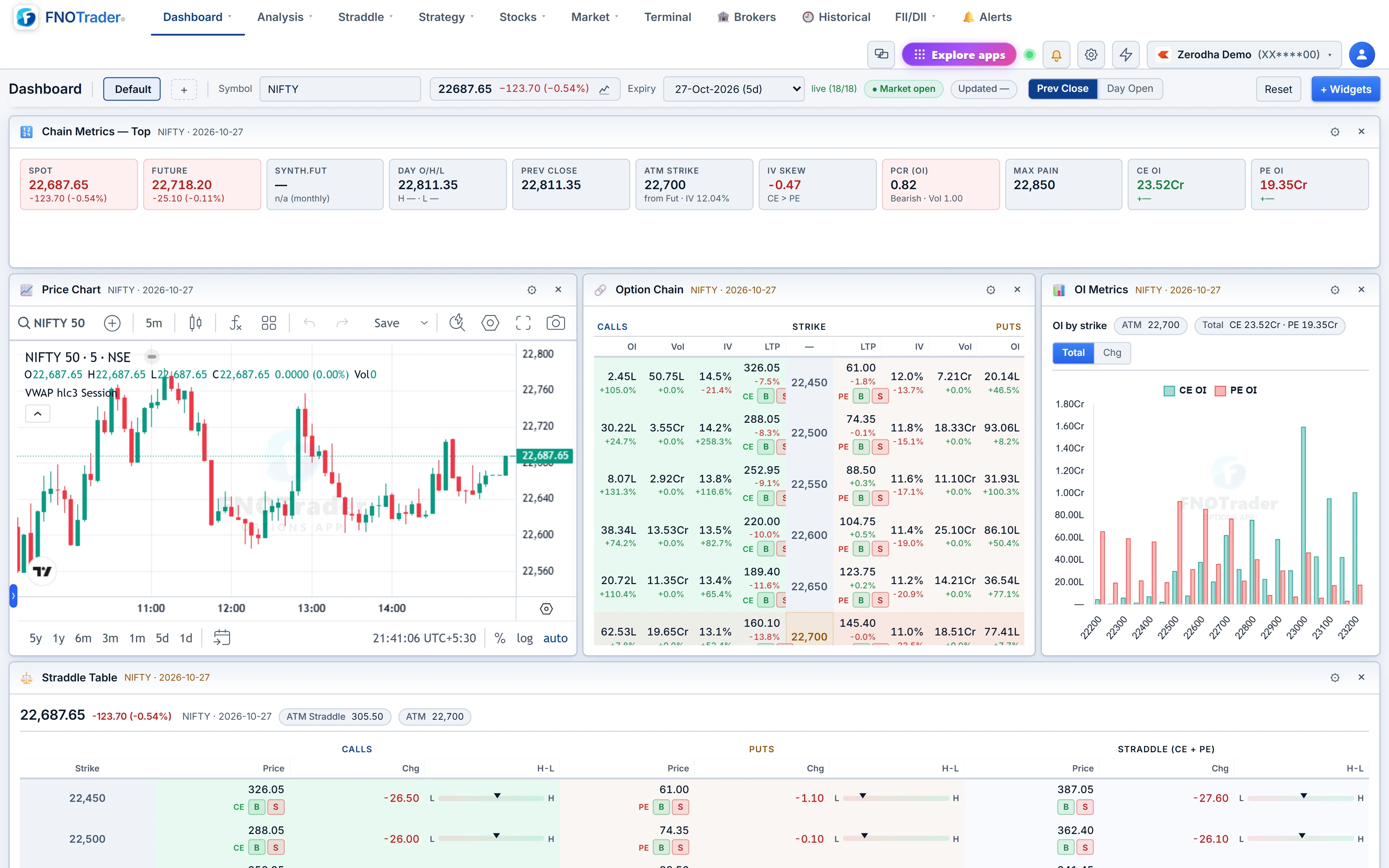
Worked example: an expiry-day board
Suppose you trade NIFTY weekly expiries and want one screen for the day.
- New dashboard, name it "Expiry", symbol NIFTY, nearest expiry.
- Keep Chain Metrics — Top for spot, PCR, max pain and ATM IV.
- Add Rolling ATM Straddle on 3-minute bars, wide across the middle.
- Add Gamma Exposure and set the option chain to ±10 strikes.
- Add Market Breadth in a narrow column on the right.
Reading it is arithmetic you can redo: if the ATM straddle opened at ₹120 and shows ₹84 at 13:00, it has decayed 36 ÷ 120 = 30% by lunch. If breadth is flat and the straddle keeps sliding, the session is quiet and decaying; if breadth is collapsing and the straddle has stopped falling, the session has changed character. For what the exposure numbers mean, see option chain analysis.
Per-widget settings worth knowing
- Strike range. Chain, straddle, strangle, OI and Greeks-sum widgets take a range around ATM — ±5, 10, 15, 20, 30, 50 or all strikes.
- Timeframe. Chart widgets take 1, 3, 5, 10, 15 or 30-minute bars.
- Symbol universe. The board's symbol can be any index, any F&O stock or an optionable MCX commodity, so a CRUDEOIL board works the same way as a NIFTY one.
- Columns. Table widgets such as the option chain let you choose which columns show, so a narrow widget can still be readable.
Build one board per question rather than one board for everything. A pre-open board answers "where are the OI walls and what is the straddle pricing?"; an intraday board answers "is the move broad, and is the straddle decaying?". Switching tabs is faster than scanning a crowded screen.
Tips and common mistakes
- Too many widgets. Every widget is live. A board with twenty panels is slower and harder to read than two boards of eight.
- Forgetting an override. A widget pinned to BANKNIFTY will not follow the board when you switch to NIFTY. Check its settings.
- Strike range too wide. ±50 strikes on a chain widget is a scroll bar, not a view. ±5 to ±10 covers what moves.
Where to find it
- Open Options Analytics → Dashboard → Dashboard-New.
- Click + beside the board tabs for a new board, or + Widgets to add a panel.
- Set the symbol and expiry in the top bar; drag and resize until it fits.
When you are ready to act on what the board shows, the QuikTrade Terminal is one click away.
Common questions
Can I keep more than one dashboard?
Yes. Each board is a tab with its own widgets, layout, symbol and expiry.
Do all widgets follow the same symbol?
By default yes, they use the board's symbol and expiry. Any widget can override its own symbol, expiry, timeframe or strike range.
Where are my dashboards saved?
In your browser. A different browser or device starts with the default board.
Which Greeks exposure widgets are available?
Delta, gamma, theta and vega exposure (DEX, GEX, TEX, VEX), cumulative GEX and a net exposure summary.
More on Options App
More in Options App · App: Options Analytics · Definitions: glossary · All: every article