What it is
A separate version of the app at options-hist.fnotrader.com,
reached from the Historical button in the Options Analytics menu, with the same analysis pages
pointed at expired contracts.
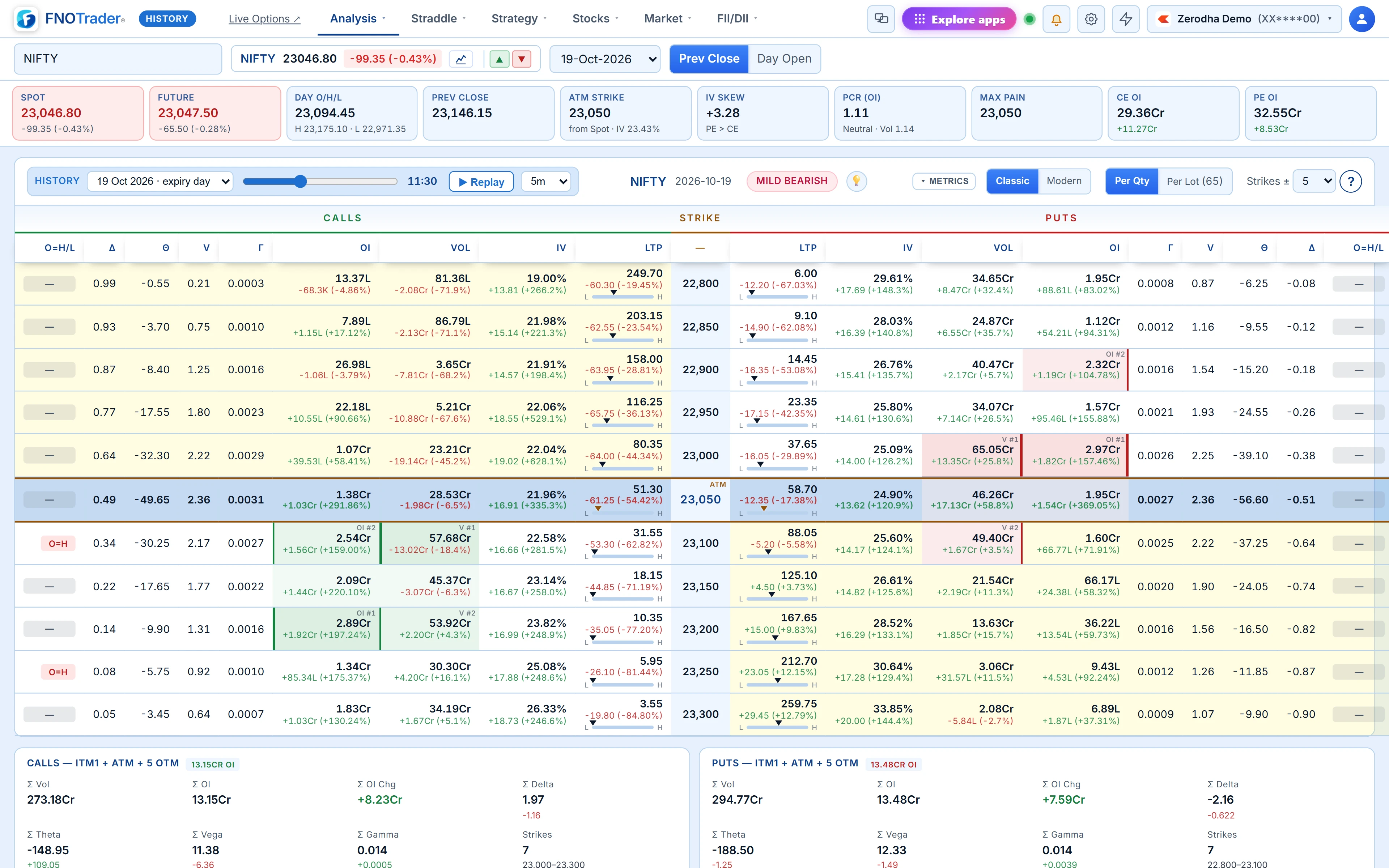
Every page in it behaves as if "now" were the minute you picked. The chain shows OI, IV and prices as of that minute; the stat cards and sentiment score are computed from that minute's data; charts end there. It has its own light-blue theme and a HISTORY badge, so it is never confused with the live app.
Which pages are available
Most analysis pages work: the option chain, Options Flow, Strike Charts, MarketWatch, Options Buildup, Open Interest, Time based Analysis, Multibaggers, Greeks Exposure, Volatility, Composite and the Options Screener; the straddle and strangle charts and tables, Rolling ATM Straddle and Straddle Insights; the strategy charts and multi-strike pages; plus the stocks, market-breadth and FII/DII pages.
What is not there is anything that places orders or depends on today: the Strategy Builder, terminal, brokers and alerts are hidden.
Choosing a contract, a day and a minute
| Control | What it does |
|---|---|
| Expiry | Lists expired contracts, newest first. |
| Date | Lists only the days that contract traded, newest first, labelled with days to expiry or "expiry day". |
| Time slider | Any minute from 09:15 to 15:30 IST; defaults to 15:30 on the latest trading day. |
| ▶ Replay | Steps the clock forward 1, 5 (default) or 15 minutes per frame. |
Pages with their own symbol and expiry pickers use the contract you choose on that page. Days to expiry, time decay and Greeks are calculated from the historical minute, so an expiry-morning chain really does show expiry-morning Greeks.
Time based Analysis keeps its own start and end sliders, because replaying a window is already what that page does.
What it is good for
- Studying expiry days. Walk through a past expiry at 15-minute steps and watch where OI was shed and how fast OTM premium collapsed.
- Checking a setup you trade. If you sell straddles at 09:20, open the chain at 09:20 on twenty past expiries and look at what the sentiment, skew and PCR said each time.
- Reviewing a trade. Put the chain, OI page and flow back at the minute you entered and see what you could have known then — no more, no less.
For testing a rule over many sessions with costs and margin, use a backtest instead; see options backtesting.
A worked review
Hypothetical: you sold a NIFTY 24,000 straddle at 10:30, three days before expiry, for a combined ₹210, and want to review it. Open historical mode, choose that expiry and the day, set the slider to 10:30.
Say the chain showed ATM IV 13.5% and the Neutral sentiment had flipped the strategy grid to its low-IV ideas (the grid does that under 14%). Press Replay at 15-minute steps. If by 13:00 the straddle is ₹245, that is a loss of ₹35 × 75 = ₹2,625 per lot (lot size illustrative), and the OI page shows which side's writers were covering while it happened. You have rebuilt what the market looked like at each step, without hindsight bleeding in.
Limits
History covers expired contracts; for today's session use the live app, where pages like OI Playback already replay the day. The time slider covers the regular session, 09:15 to 15:30 IST. Replay advances a frame only when the previous one has loaded, so long replays on heavy pages run at the speed of the data, not a fixed clock.
Where to find it
- In Options Analytics, click Historical in the top menu.
- Choose the expired contract, then a trading day from the list.
- Drag the time slider, or press Replay and pick the step size.
Common questions
Can I see an old option chain as it was at a specific time?
Yes. Historical mode shows the chain and other analysis pages for an expired contract as of any minute from 09:15 to 15:30 IST on a day it traded.
Does historical mode show Greeks as of that time?
Yes. Days to expiry and the Greeks are calculated from the historical minute you selected.
Can I replay a past session?
Yes. Replay steps the clock forward 1, 5 or 15 minutes per frame and updates the page each step.
Can I place orders in historical mode?
No. Order-placing pages such as the Strategy Builder and terminal are not available there.
More on Options App
More in Options App · App: Options Analytics · Definitions: glossary · All: every article