What it does
Pick a date, a start and an end time, and the page shows how OI at every strike changed between them — then lets you play the end time forward like a recording.
The order in which positions were built matters more than the final picture. A wall built early and held all day is a different thing from one assembled in the last hour; puts shed while price fell through them tell you who got caught. The Open Interest page shows the snapshot; this page shows the path.
Reading the OI diff ladder
Each strike has a call bar and a put bar, compared between the start and end of your window:
- Solid — OI that stayed: the smaller of the start and end values.
- Hatched — OI added: end minus start, when positive.
- Hollow — OI shed: start minus end, when positive.
Puts are green and calls red on this page, and a dotted line marks the price. Cards above show spot, total CE and PE OI, and the CE and PE change over the window. The ladder is centred on the price at the end time, with 5, 10 (default), 15, 20 or 30 strikes each side.
Note what this does and does not measure: it compares two snapshots. A strike where 5 lakh was added and then 5 lakh closed between start and end shows no change at all.
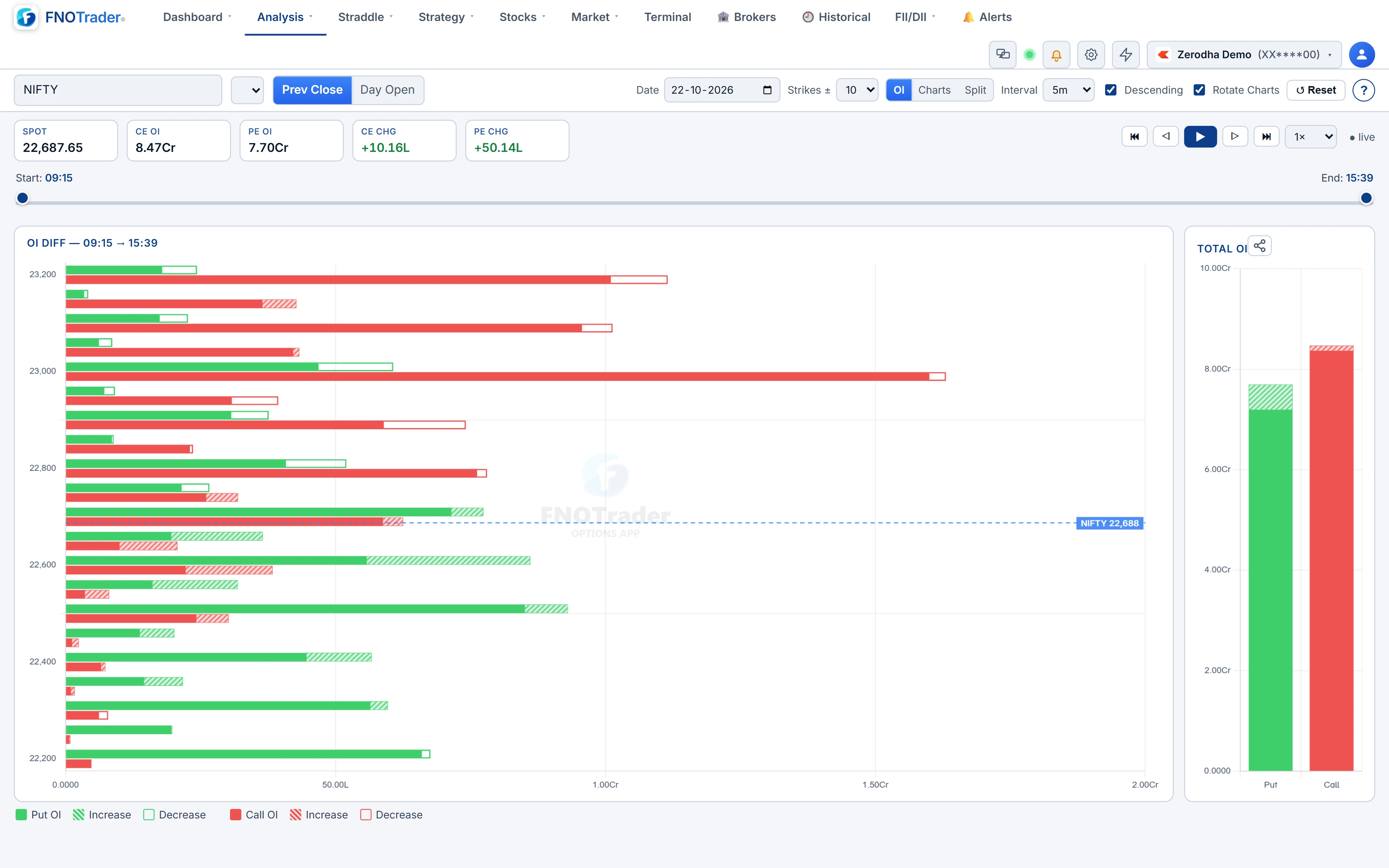
Transport, speed and the window sliders
| Control | What it does |
|---|---|
| Start / End sliders | Set the window anywhere from 09:15 to the close, IST. |
| Interval | How far each step moves the end time: 1, 3, 5, 10, 15 or 30 minutes. |
| ⏮ ◁ ▶ ▷ ⏭ | Jump to start, step back, play, step forward, jump to end. |
| Speed | 0.5×, 1×, 2× or 5× steps per second. |
| View | OI (ladder only), Charts (price only) or Split (both). |
Playing keeps the start fixed and moves the end forward, so you watch OI accumulate from a fixed reference. In the Charts and Split views, an instrument picker charts spot, the future, a CE, a PE, or CE and PE together for a strike you type, with EMA 10, EMA 20, VWAP and an OI pane.
On today's date, leave the end slider at the right edge and the page goes live, extending as each minute passes.
A worked example
Hypothetical: the 24,300 CE had 48 lakh OI at 09:30 and 71 lakh at 14:30. Stayed = 48 lakh, added = 23 lakh, shed = 0. The 24,000 PE went from 52 lakh to 39 lakh: stayed 39 lakh, shed 13 lakh.
Now play it at 5-minute steps from 09:30. Suppose the hatched segment at 24,300 CE barely grows until 13:00, then adds 18 of its 23 lakh in ninety minutes while price stalls below it. That is late writing into a stalled rally — the read a final snapshot cannot give you.
Limits and common mistakes
The page uses the contracts of the expiry selected in the top bar. To study a past day, pick a date on which that expiry was trading; for contracts that have already expired, use the historical mode.
The date picker skips weekends but not exchange holidays; a holiday simply has no data.
Do not over-read a short window. Five minutes of OI change at a single strike is often one participant adjusting a position.
Where to find it
- In Options Analytics, open Analysis → Time based Analysis (Playback).
- Choose the date, then drag the Start and End sliders.
- Pick the interval and speed, and press play. Switch to Split to watch price alongside.
Common questions
Can I replay option chain open interest for today?
Yes. Pick today's date, and leave the end slider at the right edge for a live view that extends each minute.
What does hollow OI mean in the playback ladder?
OI that was shed: the amount by which the strike's OI at the end of the window is lower than at the start.
What playback speeds are available?
0.5, 1, 2 and 5 steps per second, where each step moves the end time by the chosen interval.
Does playback show positions opened and closed inside the window?
No. It compares the start and end snapshots only, so OI that was added and then removed between them does not appear.
Which strikes does the playback ladder show?
Those around the price at the end of the window, 5 to 30 strikes on each side, so the ladder re-centres as price moves during replay.
More on Options App
More in Options App · App: Options Analytics · Definitions: glossary · All: every article