What is in it
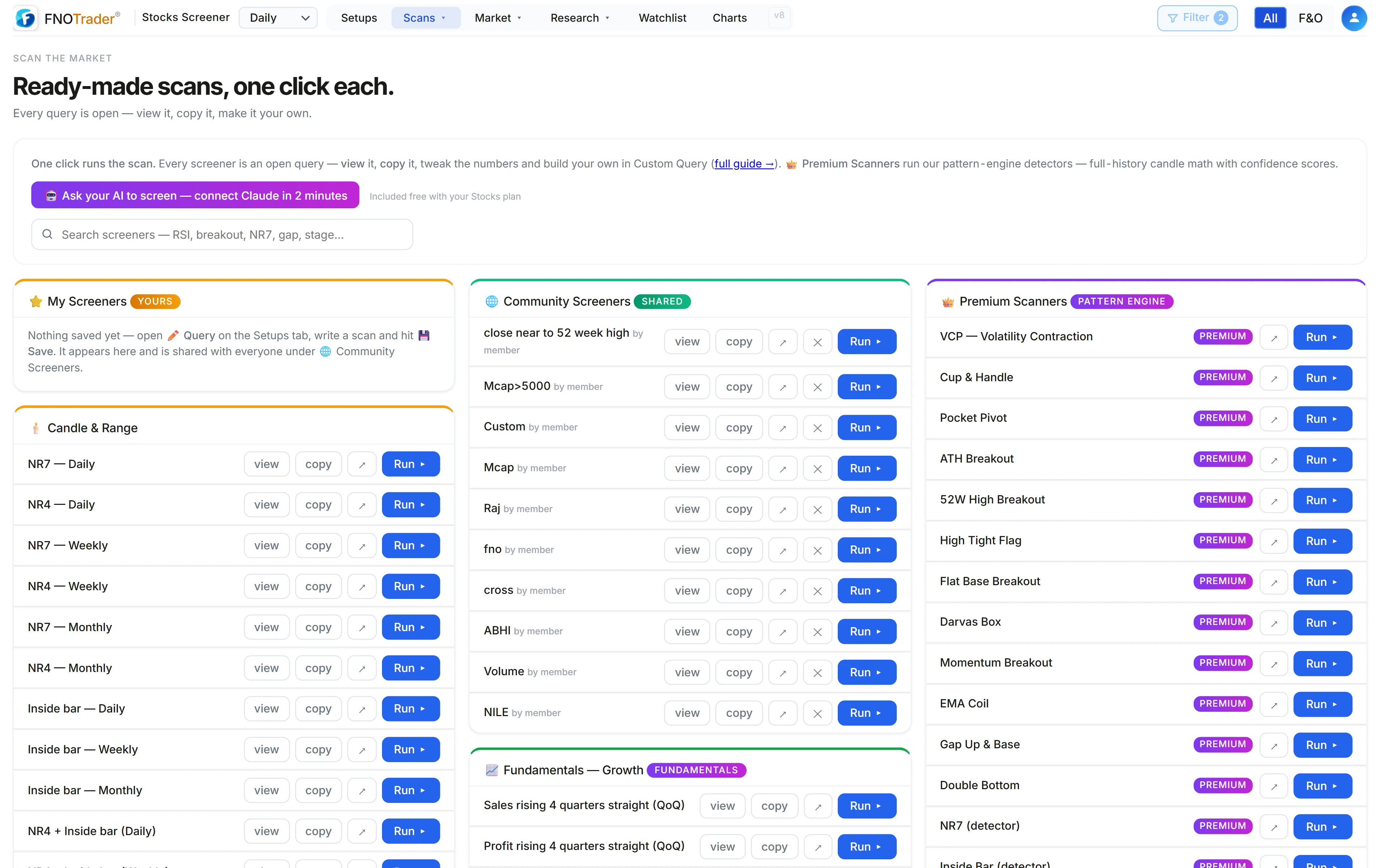
One click runs a scan. Nothing is a black box: open any screen and its conditions are right there.
| Category | Screens |
|---|---|
| Top Loved | 8 |
| Fundamentals — Growth | 14 |
| Premium Scanners | 22 |
| Indicators | 8 |
| Candle & Range | 20 |
| Range Breakouts | 7 |
| Crossover Scans | 8 |
| Bullish Scans | 7 |
| Bearish Scans | 6 |
| RSI & Momentum | 6 |
| Volume Scans | 11 |
| Investing (1Y–5Y) | 4 |
| FNOTrader Exclusive | 6 |
| Liquidity & Safety | 4 |
That is 131 screens in 14 categories, with a search box that matches names, descriptions and the queries themselves — type “NR7” or “stage”.
Two kinds of screen
Query screens (109 of them) are ordinary Custom Query lines. Each has view to show the query, copy to put it on your clipboard, and Run.
Premium Scanners (22) run the app's pattern detectors instead of a query — VCP, Cup & Handle, Pocket Pivot, ATH Breakout, Darvas Box, High Tight Flag, RS New High, Breakout Pullback and others. These are the same setups as on the Setups page, with full-history measurements and confidence scores that a one-line query can't express.
The FNOTrader Exclusive group uses fields specific to the app: Stage 2A entries with a trend template score of 6 or more, the full 8/8 trend template, and screens keyed to the daily regime (Trending, Range or Chaos).
Liquidity & Safety is the group people skip and shouldn't. It
holds screens such as Turn >= 5 AND Band = 9999 AND GSM is empty AND RS LT >
60 — liquid, no price band, not under surveillance — and the reverse
lists, stocks under GSM and stocks in tight circuit bands, so you can see what you are
filtering out. Fundamentals — Growth works the same way on
reported numbers: sales_qoq_streak >= 4 finds revenue that has risen four
quarters running.
Adapting a screen: a worked example
Start from Fresh 52W high in Range Breakouts:
Price crossed above 52W High AND RVol >= 1.5
That catches the day a stock closes through its 52-week high on 1.5× normal volume. It also catches illiquid stocks in narrow price bands. Copy it into Custom Query and add two conditions:
Price crossed above 52W High AND RVol >= 1.5 AND Turn >= 5 AND Band = 9999
Now it needs at least ₹5 crore average daily turnover and no exchange price band
(9999 is how “no band” is stored). If a ₹200 stock trades 4
lakh shares a day on average, its turnover is 200 × 4,00,000 = ₹8 crore, so it
passes the turnover floor. Save the result under your own name.
My Screeners and Community Screeners
Saving a query from Custom Query puts it at the top of the gallery under My Screeners. Saves are also published to Community Screeners, where every user can see and run them under the author name you choose — so pick a name you are happy to show, and don't put anything private in a screen's title.
- Saving again with the same name updates your existing screen rather than adding a copy.
- Each user can publish up to 20 screens.
- Deleting a screen from My Screeners removes it from Community Screeners too.
Using it well
- A screen returning zero is not broken. Event screens (crossed above, highest volume) depend on what happened in the latest session.
- Bearish scans are lists, not advice. “52-week low break” describes a chart; it says nothing about what to do with it.
- Community screens are other users' ideas. Read the query before you rely on it.
Where to find it
- In the Stocks app, open Scans → Screeners.
- Search or browse a category; click a screen to run it.
- Use view or copy to take a query into Custom Query and change it.
Common questions
Are there ready-made stock screeners for NSE?
Yes. The FNOTrader Stocks app has a gallery of 131 ready-made screens in 14 categories, from 52-week-high breakouts to sales-growth streaks, each runnable with one click.
Can I see the formula behind a screener?
Yes. Every query screen has a view button that shows its Custom Query, and a copy button to edit it. Premium Scanners run pattern detectors rather than a single query.
Are my saved screeners private?
No. Saved screens appear under My Screeners and are also shared under Community Screeners with the author name you enter. Deleting one removes it from both.
How many screeners can I publish?
Up to 20 per user. Saving again under an existing name updates that screen.
What is the difference between a Premium Scanner and a query screen?
A query screen is a single Custom Query line you can read and edit. A Premium Scanner runs one of the app's pattern detectors, such as VCP or Cup and Handle, which measure bases and levels over the stock's full price history.
More on Stocks App
More in Stocks App · App: Stocks Scanner · Definitions: glossary · All: every article