What the Setups page answers
The question is not “which stocks went up today”. It is “which stocks are sitting in a structure a swing trader would recognise”.
Every stock in the scan is run through a fixed set of detectors. A detector is a written rule — a base of a certain depth, a close above a certain high, a volume bar of a certain size — and a stock appears on the page only when at least one rule fires. Each hit carries the setup's name, a confidence score from that detector, and the numbers it measured, so you can see why the stock is there rather than trusting a badge.
ETFs and indices are not part of this scan; it is stocks only. If you are new to screening in general, start with our stock screener guide and come back.
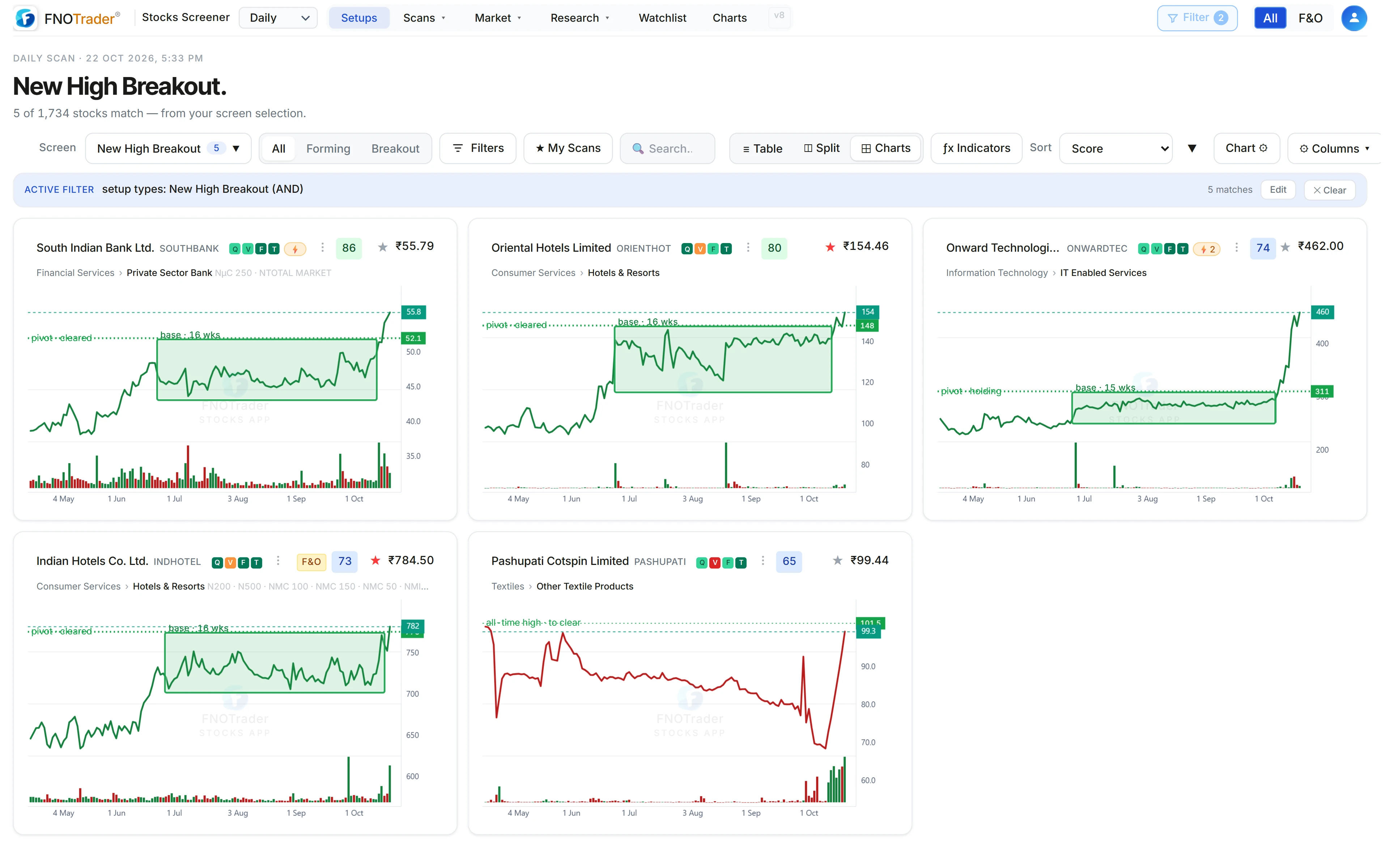
The 29 detectors, in three families
Breakout hierarchy (11). ATH Breakout, Multi-Year High, 52W High Breakout, Near ATH, Near Multi-Year High, Near 52W High, New High Breakout (a fresh six-month closing high), Swing High Breakout, RS New High (the relative-strength line at its highs before price), Breakout Pullback and Breakdown Pullback (a retest of a level that was cleared, from above or below). They are checked highest level first, so a close above the all-time high is tagged ATH Breakout and not also 52W High Breakout.
Classic patterns (14). Bull Flag, Bear Flag, Flat Base Breakout (and the looser Base Breakout), Darvas Box, High Tight Flag, Double Top, Double Bottom, Momentum Breakout, Parabolic Short, Gap Up & Base, VCP, Cup & Handle, EMA Coil (a tight hug of the 10 and 20 EMAs after a run-up) and the Inside Bar family (Inside Bar, NR4, NR7, Narrow Range on a stock already in an uptrend).
Volume (4). HVE (highest volume in the stock's history), HVY (highest in a year), HVQ (highest in a quarter) and Pocket Pivot. The first three cascade, so one bar gets exactly one tag.
Recent listings get a separate IPO Listing setup. The VCP has its own write-up in VCP and the trend template, and the breakout levels are covered in the breakout hierarchy.
The four stages of a setup
A pattern is only useful if you know where price is relative to its level. So every setup that reports a level — a pivot, a neckline, a 52-week high, an all-time high — is given one of four stages:
| Stage | What it means |
|---|---|
| Forming | Price is still under the level and close to it. Nothing has triggered yet. |
| Fresh breakout | Price has closed through the level in the last 5 sessions. |
| Higher | Price cleared the level earlier and is still above it. |
| Breakout Done | Price cleared the level, then fell back under it. |
How close counts as “close” depends on the setup — within 5% under the ceiling for a base, within 8% for most others — and a breakout from months ago no longer counts.
For bearish setups (Double Top, Bear Flag, Breakdown Pullback, Parabolic Short) the logic is mirrored: “cleared” means breaking down through support.
Setups with no level to clear get no stage, deliberately. Near ATH, Near 52W High, the volume milestones, RS New High, EMA Coil and the inside-bar coils are observations, not triggers, and inventing a stage for them would be noise.
A worked example of the stage logic
Take a hypothetical Base Breakout whose ceiling (the pivot) is ₹500. A base stays Forming within 5% under its pivot; a breakout is Fresh for 5 sessions as long as price is no more than 12% past the pivot; it is Done once price is more than 2% back under the pivot.
- Price ₹480, never closed above ₹500: (500 − 480) / 500 = 4% under, inside the 5% band → Forming. At ₹470 (6% under) it would not be listed at all.
- Price ₹512, first close above ₹500 three sessions ago → Fresh breakout, 2.4% past the pivot.
- Price ₹530, first cleared ₹500 twelve sessions ago → Higher.
- Price ₹485, cleared ₹500 earlier and is now 3% under it (below ₹490) → Breakout Done.
The same stock can sit in two setups at once — say a VCP and a 52W High Breakout — and each is staged against its own level.
Timeframes, filters and when it updates
Daily, Weekly, Monthly. The timeframe selector in the top bar switches which scan you are looking at. The same detectors run on weekly and monthly bars, so a weekly Inside Bar or a monthly 52W High Breakout is a different, slower signal than its daily twin. Levels like the all-time high are always measured on the stock's full stored history, not just the bars on screen.
On the page. The Screen menu picks one setup type, the All / Forming / Breakout switch narrows by stage, Filters narrows further, and My Scans saves the whole combination so you can reopen it. Results show as a table or as a grid of charts, and an indicator set can be applied to every chart in the grid at once. Open a stock and a “What this setup looks for” panel lists the setup's conditions.
Global filter. The Filter button in the top bar applies across the app: minimum average turnover, hide stocks that have hit circuit limits on several recent days, hide GSM (surveillance) stocks, a price range, and a minimum strength score. All of it is off by default. The All / F&O switch limits the list to stocks with derivatives.
Updates. Setups are recomputed after the close — the main run starts around 15:35 IST — and the daily scan is run again in the evening once the exchange's settled end-of-day prices are in. During market hours prices refresh, but the setup list itself is as of the last completed session. For in-session signals use the Intraday page.
Common mistakes
- Treating confidence as a probability. It is a ranking score inside one detector — tighter base, better volume, closer to the level — not a forecast. A 90 on one setup type is not comparable with a 90 on another.
- Reading a weekly Fresh breakout as today's move. Five bars on the weekly scan is five weeks.
- Ignoring liquidity. A perfect base in a stock that trades ₹20 lakh a day is a different trade from the same base in a ₹50 crore stock. Set a turnover floor in the global filter.
- Expecting levels to trade from. The scanner tells you which level a setup is built on and where price is relative to it. It does not suggest targets or stops; that part of the plan is yours.
Where to find it
- Open the Stocks app; Setups is the first tab in the top navigation.
- Pick Daily, Weekly or Monthly in the timeframe selector next to the logo.
- Use Screen to choose a setup type, and the All / Forming / Breakout switch to choose a stage.
- Click a chart or row to open the stock with its setup details.
Common questions
How many chart patterns does the FNOTrader Stocks scanner detect?
29 detectors run on every stock: 11 in the breakout hierarchy, 14 classic patterns and 4 volume setups.
Does the setup scanner update during market hours?
Prices update during the session, but setups are recomputed after the close, starting around 15:35 IST, and the daily scan is re-run in the evening on settled end-of-day prices. Use the Intraday page for in-session signals.
What does Breakout Done mean on the Setups page?
The stock closed through its setup's level and has since fallen back below it. The breakout happened and did not hold.
Can I scan weekly and monthly charts?
Yes. The timeframe selector switches the whole scan between daily, weekly and monthly bars, and the same detectors run on each.
Are ETFs included in the setups scan?
No. The Setups scan covers stocks only. ETFs have their own page in the Stocks app.
More on Stocks App
More in Stocks App · App: Stocks Scanner · Definitions: glossary · All: every article