Three rules, three problems
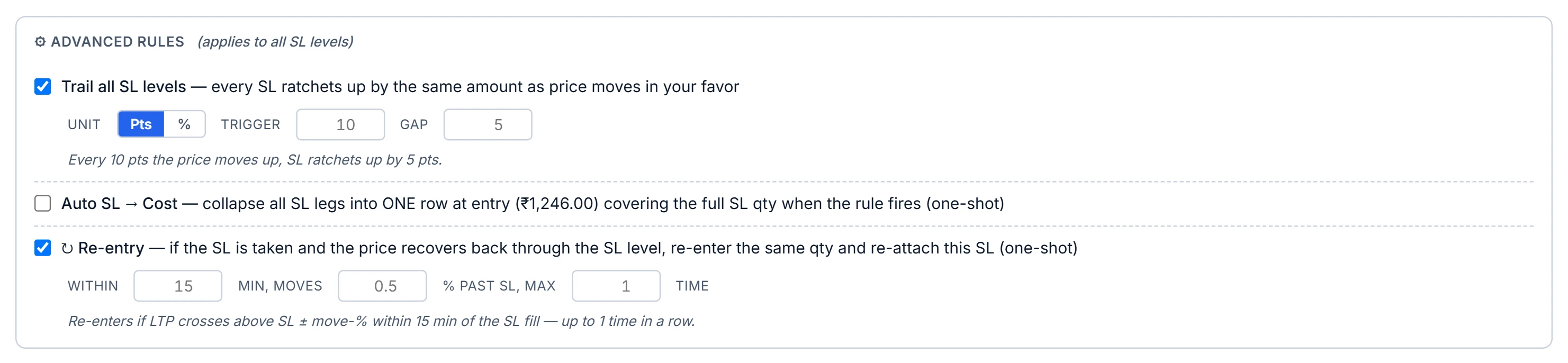
All three rules live in the Advanced rules block of the SL editor, and they apply to every SL row on the position.
- Trailing SL — moves the stop up in fixed steps as the price moves your way.
- Auto SL → Cost — once the trade has earned a set amount, moves the stop to your entry price, once.
- Re-entry — after a stop fires, buys back the same quantity if the price recovers through the stop within a short window.
They are checked on the server during market hours (09:15–15:30 IST), alongside the ordinary SL and TGT levels described in multi-level stop-loss and targets.
How the trailing stop ratchets
You set a unit (points or %), a trigger and a gap. The defaults are 10 points and 5 points. For a long position, the app keeps a reference price. Every time the price is a whole number of triggers above that reference, the stop rises by the same number of gaps, and the reference moves up by the same number of triggers. The stop only ever moves in your favour.
One detail matters: the reference starts at your stop price, not at your entry. If your stop sits more than one trigger below the market when you arm the trail, the first tick tightens it straight away. In % mode the trigger and gap are percentages of the reference price at each step.
A worked trailing example
Hypothetical. Long at ₹500, stop at ₹490, trail trigger 10 points, gap 5 points.
- Reference starts at ₹490. The first tick is ₹500: (500 − 490) ÷ 10 = 1 step. Stop moves to ₹495, reference to ₹500.
- Price ₹507: 7 ÷ 10 is less than one step. No change.
- Price ₹521: (521 − 500) ÷ 10 = 2 whole steps. Stop moves to ₹505, reference to ₹520.
- Price falls to ₹504.90: at or below the stop, so it fires.
If you want the trail to wait until the trade is in profit, place the initial stop no more than one trigger below the price, or combine it with the break-even rule below.
Auto SL to cost at 1R
R is your initial risk per share: entry minus the initial stop. The 1R mode fires when the price has moved one R in your favour; the alternative mode fires when the price reaches a level you type in.
When it fires, every SL row on the position collapses into one stop at your entry price covering the full stop quantity. The ladder of partial stops no longer makes sense once the trade cannot lose, so it is replaced. Targets are not touched. The rule fires once; if a trail has already lifted the stop above entry, it does nothing.
Example: entry ₹500, initial stop ₹490, so R = ₹10. At ₹510 the stops merge into a single stop at ₹500.
Re-entry after a stop-out
| Setting | Default | Meaning |
|---|---|---|
| Within | 15 minutes | How long after the stop fires the app keeps watching. |
| Moves | 0.5% past the stop | How far back through the stop the price must go. |
| Max | 1 time | How many re-entries in a row are allowed. |
For a long stopped out at ₹490 with the defaults, the app re-buys if the price reaches ₹492.45 (490 × 1.005) within 15 minutes. It buys the same quantity that was exited, on the same account, and re-attaches the original stop at ₹490. Each re-attached stop carries one fewer re-entry, so with Max 1 the second stop-out is final — a choppy stock cannot loop you in and out all afternoon.
Because nothing is evaluated after 15:30 IST, a watch armed near the close simply expires; it never re-enters into the next morning's gap. You can cancel an armed watch from the Monitoring tab.
Limits and common mistakes
- Re-entry is not an edge. It buys back after a loss, which doubles your exposure to the same idea; the cap exists for that reason.
- A trail in points on a ₹50 stock and on a ₹5,000 stock behaves very differently. Use % for a rule you reuse across prices.
- The break-even rule needs an initial stop on record to measure R. Without one, 1R cannot fire.
Where to find it
- In Portfolio Execution, open the SL/TGT editor on a position or holding.
- Add at least one SL row, then open Advanced rules.
- Tick Trail, Auto SL → Cost or Re-entry and set the values; the editor previews the trigger prices.
- Watch them in the Monitoring tab — see monitoring, orders and logs.
Common questions
How does a trailing stop-loss work in points?
Each time the price rises one trigger above the reference, the stop rises by one gap. With a 10-point trigger and 5-point gap, a 20-point rise lifts the stop 10 points.
What does moving the stop-loss to cost at 1R mean?
Once the price has moved in your favour by your initial risk per share, the stop is moved to your entry price, so the trade can no longer lose on that move.
Can the app re-enter a trade after my stop-loss hits?
Yes, if you enable re-entry. By default it re-buys the same quantity if the price recovers 0.5% past the stop within 15 minutes, at most once.
Does re-entry carry over to the next day?
No. Rules are only checked between 09:15 and 15:30 IST, so a watch that has not fired by the close expires.
More on Portfolio Execution
More in Portfolio Execution · App: Portfolio Execution · Definitions: glossary · All: every article