What Ask AI sees in Vol Lab
Volatility pages are where people most often nod at a number they cannot interpret. “IV percentile 82” is clear; whether that matters when realised volatility is also high is not.
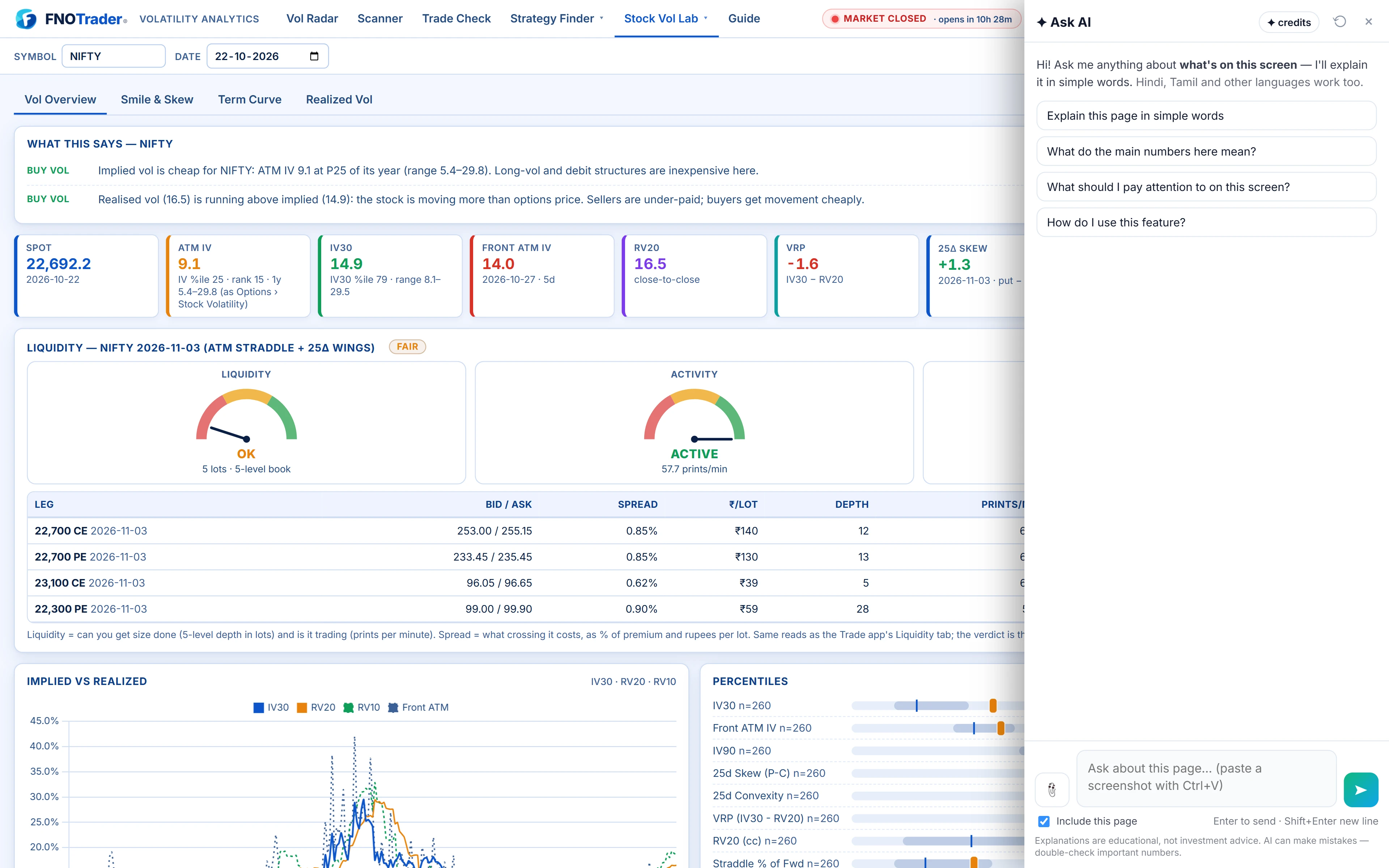
In Vol Lab, Ask AI reads the visible text of the page: the Vol Radar picks, the scanner tables, the Trade Check legs, Greeks and risk grid, and the stat cards on a stock's deep-dive. Tables and labels come through well. The smile, the term-structure curve and the volatility cone are drawn as charts, so their shape is not in the text — attach a screenshot when the question is about a curve. The clip button takes up to three images; Ctrl+V pastes one.
More on what the assistant reads is in how Ask AI reads your screen.
What it can do here
- Explain a reading. What an IV percentile, a volatility risk premium or a 25-delta skew value means for the stock on screen.
- Connect the numbers. Why a name with high IV percentile may still not be rich if realised volatility has risen with it.
- Read a chart from a screenshot. Whether the term structure is upward sloping or inverted, and where the smile is steepest.
- Read a Trade Check. What the ₹ Greeks and the risk grid say about the structure on screen, and which leg is doing the work.
It does not change scanner filters, save screens or place trades. Vol Lab itself does the calculating; the method is in how the volatility surface is built.
Questions that work, page by page
| Page | Ask |
|---|---|
| Vol Radar | “Why is this stock on the radar today?” · “Which names here have IV rich versus realised?” |
| Scanner | “What do these columns mean?” · “Which rows in this table have the widest gap between IV and realised volatility?” |
| Trade Check | “What does this risk grid say if IV falls?” · “Which leg here is paying most of the premium?” |
| Stock deep-dive | “Explain the skew shown here.” · “Is the term structure in this chart inverted?” (with a screenshot) · “What does this IV percentile mean for an option seller?” |
Each question has a screen word — this, here, these, today. A short question without one, such as “what is skew?”, is answered as a general definition without your page.
A worked example: IV percentile versus realised
Say a stock's deep-dive shows IV at 32%, an IV percentile of 85 and 20-day realised volatility at 30%. These are example numbers.
Ask: “Is IV rich here, given realised volatility?”
A good answer separates the two readings. The percentile says IV is high for this stock — higher than on 85% of past days. The volatility risk premium says IV is only 2 points above what the stock has actually been moving, so the option is not expensive against recent movement. High-but-earned volatility, not obvious excess.
Then ask the follow-up most people skip: “What would change this reading?” — for example realised volatility falling back while IV stays put. The conversation keeps context, and each new question sends the page as it is now. For the concepts, see IV percentile and VRP and smile, skew and term structure.
Limits
- Charts need a screenshot. Without one, it knows the stat cards, not the curve's shape.
- Education, not advice. “IV looks rich” is a description of the data, not a reason to sell options. It will not tell you to trade.
- Check numbers that matter. AI can misread; the page is the source.
- Credits. Each answer uses AI credits; see /pricing.
How to open it
- Open Vol Lab while logged in and go to the page you want explained.
- Click the Ask AI button at the bottom-right.
- For a curve, press Ctrl+V with a screenshot on the clipboard, then type the question.
- To ask about one passage only, highlight it on the page before asking.
Common questions
Can Ask AI explain IV percentile in Vol Lab?
Yes. Ask on the page with a screen word, such as 'What does this IV percentile mean here?', and it explains it alongside the realised volatility shown.
Can it read the term-structure chart?
From a screenshot. The curve is drawn as a chart, so paste or attach an image and ask whether it slopes up or is inverted.
Will Ask AI tell me to sell options when IV is high?
No. It describes what the volatility data reads like but does not recommend trades.
Why did 'what is skew?' ignore my page?
Short questions without a screen word are treated as general. Ask 'explain the skew shown here' instead.
More on Volatility Analytics
More in Volatility Analytics · App: Volatility Analytics · Definitions: glossary · All: every article